
Clean Verbatim Transcription: A Practical Guide
Learn what clean verbatim transcription means, how it differs from full verbatim, and how to produce accurate, readable transcripts for any workflow.
You've got a transcript open in front of you, and it's doing exactly what raw speech does. The speaker starts a thought, abandons it, circles back, repeats a phrase, and leaves a trail of filler words behind. A transcript like that may be faithful to the recording, but it isn't always faithful to the work you need to do with it.
That's where clean verbatim transcription comes in. It sits in the middle of the spectrum, keeping the speaker's meaning intact while stripping away the clutter that slows readers down. The skill is not making speech prettier, it's deciding what noise can go without changing the record.
Why Raw Transcripts Slow Readers Down
A researcher opens an auto-generated interview file and spots the problem right away. One participant says, “I, uh, I think, I think we, we should maybe, um, go with the second option,” then stops mid-sentence and starts again. A second speaker repeats the same phrase, and the timestamps drift just enough to make the passage harder to find.
The same thing happens in customer calls, team meetings, and marketing reviews. The raw transcript preserves the recording, but the page still reads like speech, not like a document people can scan. If your work is to quote, compare, tag themes, or share notes, you end up spending time twice, once to create the transcript and again to make it usable.
Practical rule: A transcript is only useful if a human can move through it faster than the original audio.
Speech and reading ask for different shapes. Spoken language includes restarts, overlaps, and verbal padding. Written language needs enough of that material removed that the meaning stays intact, while the eye can move without tripping over every false start. In that sense, clean verbatim is a readability-versus-fidelity choice, and AI workflows shift where that line should sit. A speech-to-text workflow overview, a speech-to-text workflow overview, shows how the capture stage fits into the wider process.
For researchers and marketers, the pain point is the same. You do not just need the words. You need the words in a form that lets you search, quote, review, and act without wrestling the transcript first.
What Clean Verbatim Actually Means
Clean verbatim transcription keeps the speaker's meaning and wording, but removes the mechanical noise that doesn't add semantic value. The aim is simple, readability without distortion. That means you keep the actual ideas, the qualifiers, the hedges, and the tone, while clearing out filler words, false starts, repetitions, and fragments that only make the page harder to read.
What gets removed and what stays
A clean transcript is not a summary. It doesn't paraphrase, and it doesn't rewrite someone into polished prose they never used. It just trims the speech habits that slow readers down. A useful analogy is a window, the view stays the same, but the smudges are gone.
A short example makes the boundary clearer:
Raw speech, “I mean, I was, uh, kind of thinking we should, should probably delay it because the numbers weren't ready.”
Clean verbatim, “I was kind of thinking we should probably delay it because the numbers weren't ready.”
The second version says the same thing. It just removes the clutter that doesn't change the message. That distinction matters in captioning, research notes, and archives where readers need a faithful record that still scans cleanly. For a related walkthrough on turning spoken material into a readable transcript, this guide to writing a video transcript is a useful companion.
Clean verbatim also sits between two other extremes. Full verbatim keeps every pause and stumble. Edited prose smooths language more aggressively and can drift toward a written version of the speech rather than the speech itself. Clean verbatim keeps you close to the original while making the page usable.
The practical boundary
The easiest way to judge clean verbatim is this, if removing a word changes what the speaker meant, leave it in. If it only changes how smooth the sentence looks, it probably comes out. That one test keeps the work disciplined and protects the transcript from becoming a rewrite.
Clean Verbatim Versus Full Verbatim
The difference shows up fast when you put both styles beside each other. Full verbatim preserves the speaker's vocal behavior, while clean verbatim preserves communicative intent with the noise removed.
| Full Verbatim | Clean Verbatim | Edit Applied |
|---|---|---|
| “I, uh, I think we should, should maybe go with, with the second option because, um, the data wasn't, wasn't ready.” | “I think we should maybe go with the second option because the data wasn't ready.” | Removed fillers and repeated words |
| “The launch was, was, was delayed, and I mean, we had to, you know, reset the timeline.” | “The launch was delayed, and we had to reset the timeline.” | Collapsed repetition and filler phrases |
| “I started to say the budget was fine, but, uh, actually, no, it wasn't.” | “I started to say the budget was fine, but actually, no, it wasn't.” | Removed restart clutter, kept correction |
| “We met on Tuesday and, [pause], after that, moved the release date.” | “We met on Tuesday and, [pause], after that, moved the release date.” | Kept a meaningful pause marker |
The point of the comparison is not that one style is better in every case. It's that they serve different reading tasks. Full verbatim helps when the exact rhythm of speech matters. Clean verbatim helps when the reader needs to move through the content without getting stuck on every hesitation.
The clean version should never change the speaker's meaning. If it does, the edit crossed the line.
A transcription lead usually checks each line with the same question, is this word carrying meaning, or is it just part of the mechanics of speaking? That question is what separates cleaning from rewriting.
The Mechanical Rules of Clean Verbatim Editing
The rules are narrower than many people think. Clean verbatim removes fillers like “um,” “uh,” and “you know” when they don't carry meaning, drops obvious false starts, collapses repeated words, and leaves intact the material that would change interpretation. Numbers, names, technical terms, and domain jargon stay as spoken unless there's a clear transcription error to fix.
What to remove and what to keep
Here's the simplest version of the rule set.
| Raw Speech | Clean Verbatim | Rule Applied |
|---|---|---|
| “I think, uh, I think we should go.” | “I think we should go.” | Removed restart and filler |
| “The, the report is ready.” | “The report is ready.” | Collapsed repetition |
| “I literally ran the data myself.” | “I literally ran the data myself.” | Kept emphasis word |
| “We need the Q4 forecast, [laughter], before Friday.” | “We need the Q4 forecast, [laughter], before Friday.” | Kept non-verbal tag |
| “Speaker A, um, can you send it?” | “Speaker A, can you send it?” | Removed filler, kept label |
The clean-up boundary is easier to manage when you remember that punctuation can be corrected, but voice shouldn't be rewritten. A broken sentence can be made readable, but it shouldn't suddenly sound like a different person wrote it. If the original speaker sounded casual, cautious, or uncertain, the cleaned transcript should still feel that way.
Timestamping and speaker labels also need consistency. One clean-verbatim guideline recommends adding timestamps at each speaker change, which helps listeners jump back into the recording fast. Another transcription guide suggests timestamps every 30 to 60 seconds for most interviews, but the key point is the same, timestamps are there to support verification, not to decorate the page (timestamp guidance).
For a practical editing workflow, this clean transcript resource is relevant because it reflects the same idea, remove clutter, keep meaning, preserve the timing structure.
The one-rule test
If deleting a word changes the speaker's certainty, emphasis, or intent, it stays. That's the whole test in one line. It keeps a junior transcriber from “improving” the transcript into something safer to read but less faithful to the original exchange.
Choosing Between Clean, Edited, and Intelligent Verbatim
The right style depends on who will read it and what they'll do with it. A clean transcript is the best fit when the text will be quoted, searched, coded, or archived. An edited transcript goes further and reads more like polished writing, while intelligent verbatim lands between those two, smoothing some rough edges without fully rewriting the speech.
| Criteria | Clean Verbatim | Edited Transcript | Intelligent Verbatim |
|---|---|---|---|
| Readability | High | Very high | High |
| Fidelity to speech | High | Moderate | Moderate to high |
| Typical use | Research, archives, subtitles | Articles, summaries, publish-ready text | Meetings, webinars, internal recaps |
| Downstream compatibility | Strong for quoting and analysis | Strong for polished reading | Strong for general sharing |
| Cleanup level | Light | Heavier | Middle ground |
The decision rule is straightforward. If the transcript may be quoted or analyzed, stay close to clean verbatim. If the audience only needs a smooth narrative, move toward edited. If the job sits in the middle, intelligent verbatim usually makes sense.
One useful example is meeting content. A team may want exact decisions, owners, and commitments, but not every hesitation in the room. In that case, intelligent verbatim can work well, while a research interview about user behavior usually needs the tighter fidelity of clean verbatim. For teams comparing workflow options, this AI meeting note taker page is a practical reference point because it sits in the same use-case territory.
A quick selection filter
Ask three questions before you start.
- Will someone quote this? If yes, stay closer to clean verbatim.
- Will someone skim this like a document? If yes, edited may be better.
- Will this be used for analysis or evidence? If yes, preserve more of the original speech.
That choice saves time later. A transcript that fits the use case at the start usually needs less rework at the end.
A Practical AI-Assisted Cleanup Workflow
A rough transcript is only a starting point. AI can draft quickly, but the first pass still shifts with speaker accent, recording quality, and the kind of content being captured. A survey study found that Whisper produced 72.5% perfect or almost perfect transcripts, 22.3% with small discrepancies or minor errors, and 5.2% with insufficient quality or major errors, while Google's API showed 36.7%, 43.3%, and 20.0% in those same categories. Those results explain the tradeoff clean verbatim asks you to make, keep enough of the original speech to preserve meaning, then trim only the clutter that makes reading harder.
A six-step review rhythm
- Upload the source audio with speaker diarization enabled. Speaker separation gives you a cleaner base before any text cleanup begins.
- Generate a near-clean verbatim draft, not full verbatim. That first pass should read like a working copy, not a courtroom record.
- Review proper nouns, domain terms, and multilingual segments. AI often smooths over names and terms that matter.
- Apply the cleaning rules paragraph by paragraph. Treat each block the same way so the transcript keeps a steady voice.
- Check timestamps against the audio scrubber on low-confidence segments. When the output looks uncertain, the recording decides what stays.
- Export in two formats, one for media, one for analysis. A timestamped .srt or .vtt file works for subtitles, while a clean .docx or .md file is easier for review and coding.
{% youtube id="GNc6uJk3dP0" /%}
If speed is part of the workflow, this guide on how to streamline AI processing speed fits well beside the transcription pass. Faster processing helps only when the review step stays disciplined.
Final checks before export
- Speaker labels are consistent.
- The glossary matches the project terms.
- The read-aloud pass still sounds like the original speaker.
- Timestamps line up where the recording changes topics or speakers.
A strong AI-assisted workflow does not remove judgment. It gives you a better draft, then lets you spend attention where it matters most.
Where Cleaning Becomes Risky or Wrong
Cleaner isn't always better. In some contexts, removing hesitation or restarts strips out meaning that readers need. That's why clean verbatim should be treated as a default, not a doctrine.
In qualitative research, a pause can signal reflection, discomfort, or uncertainty. If the interviewer is studying how people make decisions, those pauses may matter as much as the words around them. In legal and deposition settings, every utterance may get examined for intent, so over-editing can create more risk than clarity. In investigative journalism, a stumble or self-correction can be part of what makes a quote relevant.
If removing a word changes what the reader thinks about the speaker's state of mind, leave the word in.
That principle also shows up in guidance about clean verbatim and edited transcripts, which warns against paraphrasing, misattribution, or cutting meaningful dialogue. A useful reminder for high-stakes publishing is that the transcript should preserve the record, not just the appearance of polish (clean vs edited guidance).
The same caution appears in another reference on the difference between verbatim and clean verbatim, where strict accuracy matters more in legal proceedings and exact-detail use cases (verbatim and clean verbatim comparison). In those settings, a missing hesitation or softened interruption can change how a statement is interpreted later.
For quote-sensitive or rights-sensitive files, this copyright claims resource is relevant because it sits close to the same question, how much alteration is still faithful to the source. The answer depends on the use case, not on a universal cleaning rule.
A Pre-Export Checklist and Decision Rules
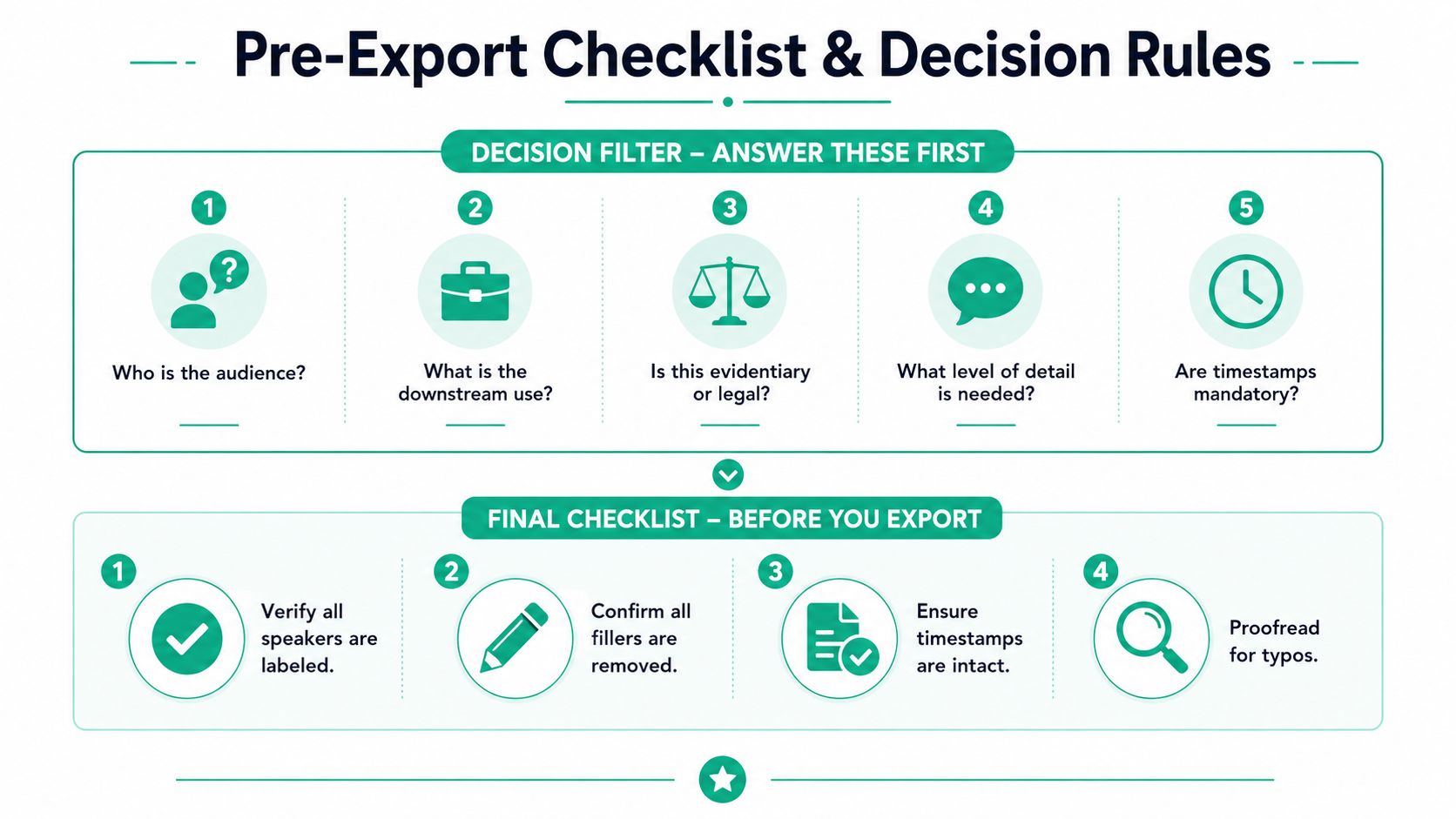
Before you save anything, ask five questions. Who is the audience? What's the downstream use? Is this evidentiary or legal? How much detail is needed? Are timestamps mandatory? Those answers determine whether clean verbatim is right, or whether you need to keep more of the original speech.
Content integrity
- Are all speakers labeled consistently?
- Are proper nouns spelled the way the project glossary says?
- Are numbers, dates, and technical terms preserved as spoken?
- Are non-English terms left intact unless the workflow requires translation?
Structural integrity
- Do the timestamps align with speaker changes or the chosen interval?
- Are paragraph breaks placed where the topic shifts, not randomly?
- Are headings or speaker tags formatted the same way throughout?
- Does the transcript still read like one coherent exchange?
Formatting integrity
- Is the file exported in the format the audience needs?
- Does the delivery channel support the chosen timestamp style?
- Is the naming convention clear enough to avoid version confusion?
- Are access settings or sharing controls correct before sending?
For subtitle work and video reuse, this YouTube subtitle generator resource fits naturally into the same decision flow because subtitle formatting depends on timing and readability working together. Clean verbatim helps there, but only when the export matches the final platform.
Clean verbatim is a service level, not a quality badge. The goal isn't the smoothest possible prose, it's the exact form of readability the job calls for. If the transcript will be read, quoted, reviewed, or published, the right amount of cleaning is the amount that preserves meaning and removes only the noise.
If you want a transcript workflow that keeps meaning intact while making the text easier to use, visit transcript.im and try it on your next interview, meeting, or video file. It's built for turning speech into clean, timestamped text, so you can move from raw audio to a readable transcript without losing the structure you still need.
Transcript Generator
Turn Any Video Into Text
Paste a YouTube, TikTok, or Instagram link and read the transcript, with timestamps on every line.
Exports as TXT, SRT, or VTT.