
Working with Video in Japanese: A Practical Guide
Learn how to handle video in Japanese with confidence — detect the language, transcribe audio, translate subtitles while preserving timestamps, and pick
You've got a Japanese YouTube link open, three tools are already in play, and none of them agree on what the speaker said. One export has missing lines, one transcript smooths over important words, and one subtitle draft feels readable until you try to line it up with the audio. That's the normal pain point with video in Japanese, and it's why a generic workflow usually falls apart before the subtitles even exist.
Japanese video needs a deliberate path because the language changes the job at every step. The audio can be dense with loanwords, honorifics, clipped responses, and fast back-and-forth that a plain speech-to-text pass doesn't always handle cleanly. The text side has its own rules too, since Japanese captions often carry more meaning per character, and the on-screen space is tighter than many English-first editors expect.
A good workflow starts with four moves, detect, transcribe, time, and translate. If you skip any one of those, the rest of the file becomes harder to trust. For a practical starting point, the Japanese transcript workspace shows the kind of structure that makes this work less chaotic.
Why Japanese Video Deserves Its Own Workflow
A team lead drops a 30-minute Japanese webinar link into a shared doc. One person runs it through a subtitle site, another tries a general AI tool, and a third pastes the audio into a caption editor. By the end, all three files look different, and none of them can be used without cleanup.
That situation happens because Japanese video is not just “video, but in another language.” The source audio often mixes formal and casual speech, adds short backchannels, and leans on context that an English-centric tool may flatten away. The result is that transcription, subtitle timing, and translation all need more care than a standard one-pass workflow.
Raw video to usable text is not one straight line
A Japanese video usually moves through a sequence like this, even when the team doesn't name it that way. First, someone checks what language the publisher says it is. Next, they confirm what the audio sounds like. After that, they decide whether to pull existing captions or generate a new transcript. Only then do they translate, time, and export.
That sounds simple, but the breakpoints matter. Japanese subtitles often need more visual breathing room, and translated lines can easily become too long for the original cue window. A workflow that ignores those limits creates text that looks fine in a document and fails the moment it lands in a player.
Practical rule: treat Japanese as a timed-text project, not a copy-paste translation job.
A lot of confusion comes from people assuming subtitles are just dialogue in another language. They're not. They're a compressed reading experience attached to moving video, and Japanese makes that compression more visible because the writing system itself carries a lot of information per character.
Captions that look “short” on a page can still feel crowded on screen.
That's why the rest of this guide stays close to the actual mechanics. If you can detect the language correctly, get a clean transcript, preserve timing, and keep the translated cues readable, you can reuse the same process across lectures, interviews, webinars, and social clips.
Detecting That a Video Is Actually in Japanese
The safest way to identify Japanese is to use three signals together, not one guess. Metadata tells you what the publisher claims. The audio sample tells you what people are saying. The caption track tells you what another system or uploader already treated as the working language.
Start with what the platform and file already say
Look at the language field if the platform exposes one. Check tags, descriptions, and any uploaded subtitle tracks. Vimeo, podcast enclosures, and local file metadata can also carry useful hints, even when they're incomplete.
Then play a short audio sample and let an ASR probe auto-detect the language. Japanese usually flags cleanly when the speech is straightforward. Problems show up when the track switches between Japanese and English, or when a speaker uses a lot of borrowed words and code-switching.
Finally, inspect any existing captions. A ja-JP or ja-CC track is the strongest signal you can get. On YouTube, auto-captions for Japanese often leave familiar debris such as full-width spacing or stray punctuation, which is still useful because it confirms the system has already treated the audio as Japanese.
Use the strongest signal, then document the edge case
If the three checks agree, the decision is easy. If metadata says English but the audio probe and captions both look Japanese, trust the audio and the caption track over the label. The publisher may have tagged the upload incorrectly, but the spoken content is still what your transcript needs to reflect.
If the checks disagree, record the reason in your working notes before you move on. That matters because downstream tools, editors, and reviewers all benefit from the same language assumption. A clean handoff beats a perfect guess.
| Three signals for detecting Japanese in a video | |||
|---|---|---|---|
| Signal | What it checks | Reliability | When to trust it |
| Metadata | Language fields, tags, file details | Moderate | When the publisher is careful |
| Audio probe | What the speaker actually says | High | When the speech sample is clear |
| Caption track | Existing ja-JP or ja-CC text | Very high | When a subtitle track already exists |
For a broader capture workflow, the speech-to-text path for Japanese video is useful because it starts from the content itself instead of assuming the label is right.
Transcribing Japanese Audio the Reliable Way
The cleanest transcription path depends on whether captions already exist. If they do, use them first. If they don't, generate a transcript from the audio. That sounds obvious, but for Japanese it saves a lot of rework because existing timed text is often closer to usable than an ASR draft.
Captions first when the track is already there
When a ja-JP track exists, export it and convert it into a clean text plus timestamps format. TTML and WebVTT both carry timing, and that timing should stay intact while you clean the text. The first job is not to “improve” the wording. It's to make sure the transcript covers the whole audio track without gaps.
That coverage check matters more than people expect. A caption file can look polished and still miss speaker turns, stage directions, or short interjections. If you spot those gaps before translation, you avoid pushing incomplete text into the next stage.
A clean captions-first workflow usually means three simple passes:
- Extract the timed track from the source platform or file.
- Normalize the text into a readable transcript with timestamps still attached.
- Compare coverage against the audio so missing segments show up early.
ASR first when there's no usable caption track
If no captions exist, use speech-to-text on the audio itself. Japanese generally benefits from models that are comfortable with conversational speech, because newsroom-style assumptions can miss clipped endings, casual phrasing, and short grammatical particles that matter to meaning even when they don't map neatly into English.
Before you run the transcription, give the engine any custom vocabulary it needs. Project names, product names, surnames, and brand terms all help. Then choose the output script carefully. Kana can be better for raw capture, while kanji plus okurigana often reads more naturally for review.
If there are multiple speakers, diarization is worth turning on. Without speaker separation, Japanese interviews and discussions turn into a wall of text very quickly. After the first pass, check three random minutes side by side against the original audio. That spot check will catch the corrections that show up again and again, especially half-width numbers, punctuation drift, and dropped sentence-final particles.
The Japanese video-to-text workflow is a good example of how a clean transcription workspace can keep those cues organized instead of forcing you to rebuild them later by hand.
What Makes Japanese Subtitles Trickier Than English
Japanese subtitles ask for a different reading habit than English. English leans on word boundaries, spacing, and a familiar line rhythm. Japanese can compress more meaning into fewer visible marks, so a line that looks short on paper can still feel crowded on screen.
Character density changes everything
A professional Japanese style guide sets reading speed at 4.0 characters per second, and it counts half-width characters as 0.5 according to OOONA's Japanese style guide. That rule is useful because it shows how Japanese subtitles are judged by visual load, not just by character count. One kanji can carry a lot of meaning without taking much space.
Netflix's Japanese timed-text guidance gives the same picture from another angle. It uses a minimum subtitle duration of 0.5 seconds per event, allows up to 7 characters per second in SDH contexts, and often caps horizontal lines at about 13 full-width characters in its Japanese style guide. The exact numbers matter less than the principle. Subtitle timing has to give the eye enough room to read before the scene moves on.
Half-width and full-width text are not the same problem
Generic subtitle tools often miss this. Numbers, brackets, punctuation, and prolonged sound marks can all appear in half-width or full-width form, and that changes how crowded the cue feels. A string that looks fine in a text editor can look cramped once it sits inside the subtitle frame.
English editors often count words per line. Japanese editors have to watch character density, symbol balance, and how long the viewer needs to land on each cue. A subtitle can be linguistically correct and still be hard to read if the visual load is too high.
| Japanese vs English Subtitle Constraints | ||
|---|---|---|
| Constraint | Japanese | English |
| Reading pace | About 4.0 characters per second in OOONA's Japanese style guide | Often managed by word rhythm rather than character density |
| Line length | About 13 full-width characters in Netflix's Japanese Timed Text Style Guide | Usually wider character counts on screen |
| Symbol handling | Half-width and full-width forms change visual density | Less of a layout issue |
| Timing window | Short cues need careful pacing | Timing still matters, but the visual load is lighter |
If a Japanese cue feels crowded, shorten it before you adjust the font.
That habit pays off. A subtitle that stays inside the line budget is usually easier to read than one that tries to preserve every spoken word exactly.
Translating Subtitles Without Losing the Timing
Translation gets easier once you stop treating the subtitle file like a plain document. Each cue already has a start time, end time, and a limited reading window. The translation has to fit inside that window, not the other way around.
Freeze the cue windows first
Load the SRT or WebVTT file and keep the timestamps fixed. SRT uses a sequence number, a start and end timestamp, and one or two lines of text. WebVTT uses the same basic timed cue logic, with period-separated timestamps instead of commas as described in this subtitle format guide. The structure matters because the timing is what keeps the subtitles synchronized.
If a cue is too long after translation, shorten the wording or split the thought across two cues. If it's too short, you can leave a bit of breathing room so the line doesn't flash by unnaturally fast. The important thing is to keep the original timing stable while the text changes.
Translate inside the window, not outside it
A readable subtitle translation should preserve the meaning without forcing the viewer to reread the screen. That means simplifying clauses, trimming filler, and respecting the character budget you already checked in the previous section. It also means keeping an eye on the player format, since some systems prefer WebVTT while others expect SRT sidecars.
For teams that want to move faster, a workflow that supports translate videos with AI can help produce a first pass, but the timing still needs a human review before export. That review is where you catch lines that technically translate well but sit awkwardly in the cue window.
For a Japanese-focused subtitle build, the subtitle generator for Japanese clips is one of the practical routes that keeps the timing structure visible while you work.
{% youtube id="VpDRJT0vSH8" /%}
Choosing a Tool That Handles Japanese Well
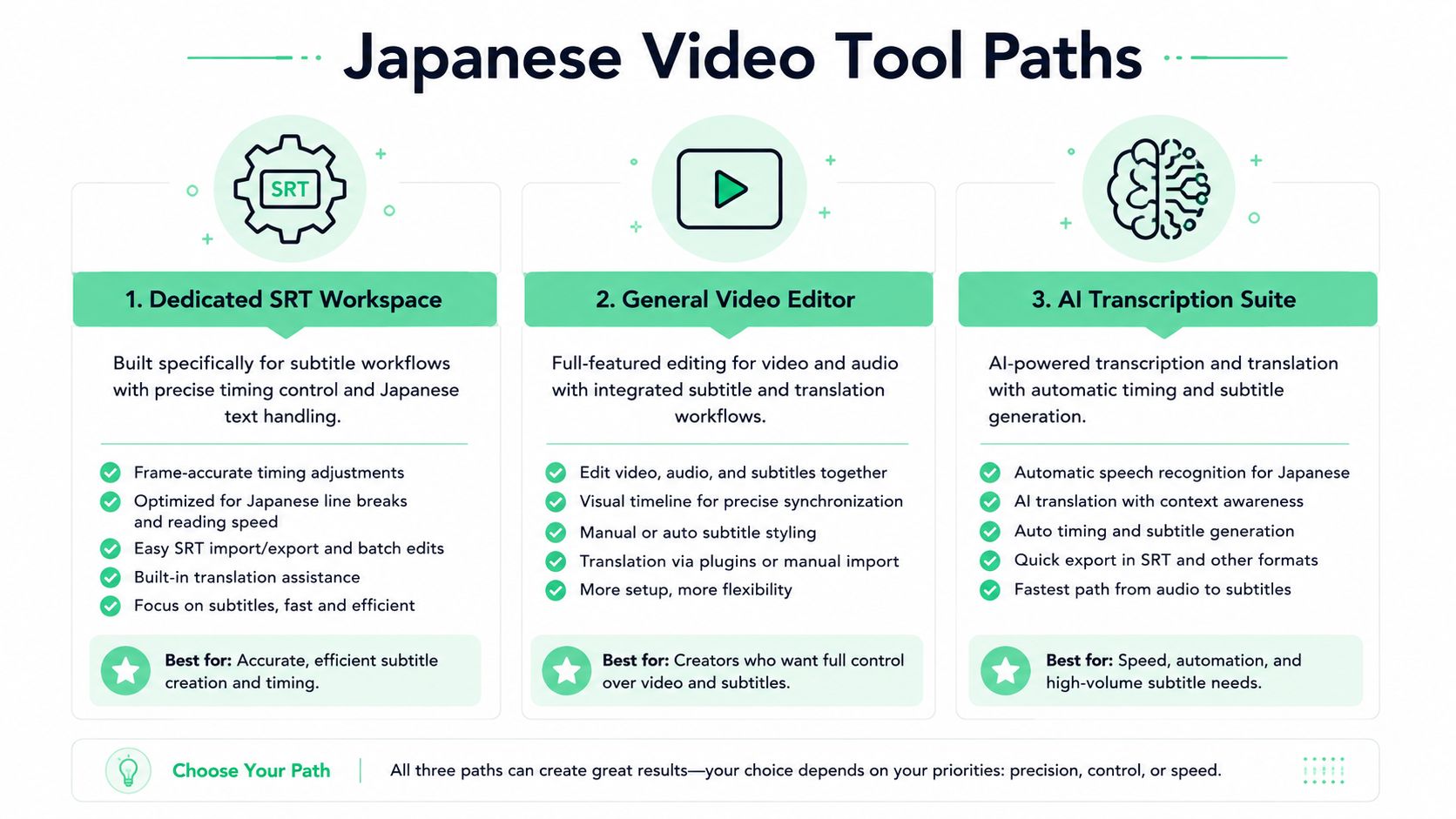
Three tool paths show up again and again for video in Japanese. One is a dedicated transcription workspace that keeps timed text editable. Another is manual captioning in a general video editor. The third is a broader AI tool that tries to do transcription, translation, and burn-in in one place.
Match the tool to the deliverable
A dedicated workspace makes the most sense when you need SRT or VTT output, editable cues, and Japanese-aware cleanup. That's the path people use when subtitles need to stay reusable downstream, not just look good once on one platform.
Manual captioning still has a place. It works well for short clips, especially when a fluent reviewer is sitting nearby and can time the lines by hand. The problem is effort, not theory. Per-line counting and timing become tedious fast once the clip gets longer.
General-purpose AI tools can be useful for rough drafts. They can also flatten the timing structure or hide the details that matter for Japanese readability. That means you still end up checking line length, cue duration, and punctuation behavior yourself.
Use the tool that leaves the least cleanup
The best decision rule is simple. Choose the workspace when you need editable captions and Japanese-specific QC. Choose manual captioning when the clip is short and a human is available. Choose a general AI tool when a draft is enough and you already expect to rework the file later.
A web-based option like Japanese subtitle generator quso.ai can be useful when you want a quick subtitle pass for comparison, but it still leaves the timing review to you if the final file has to stay readable. That's normal. Japanese timed text is picky, and the tool should help you see the structure instead of hiding it.
A Repeatable Workflow You Can Reuse
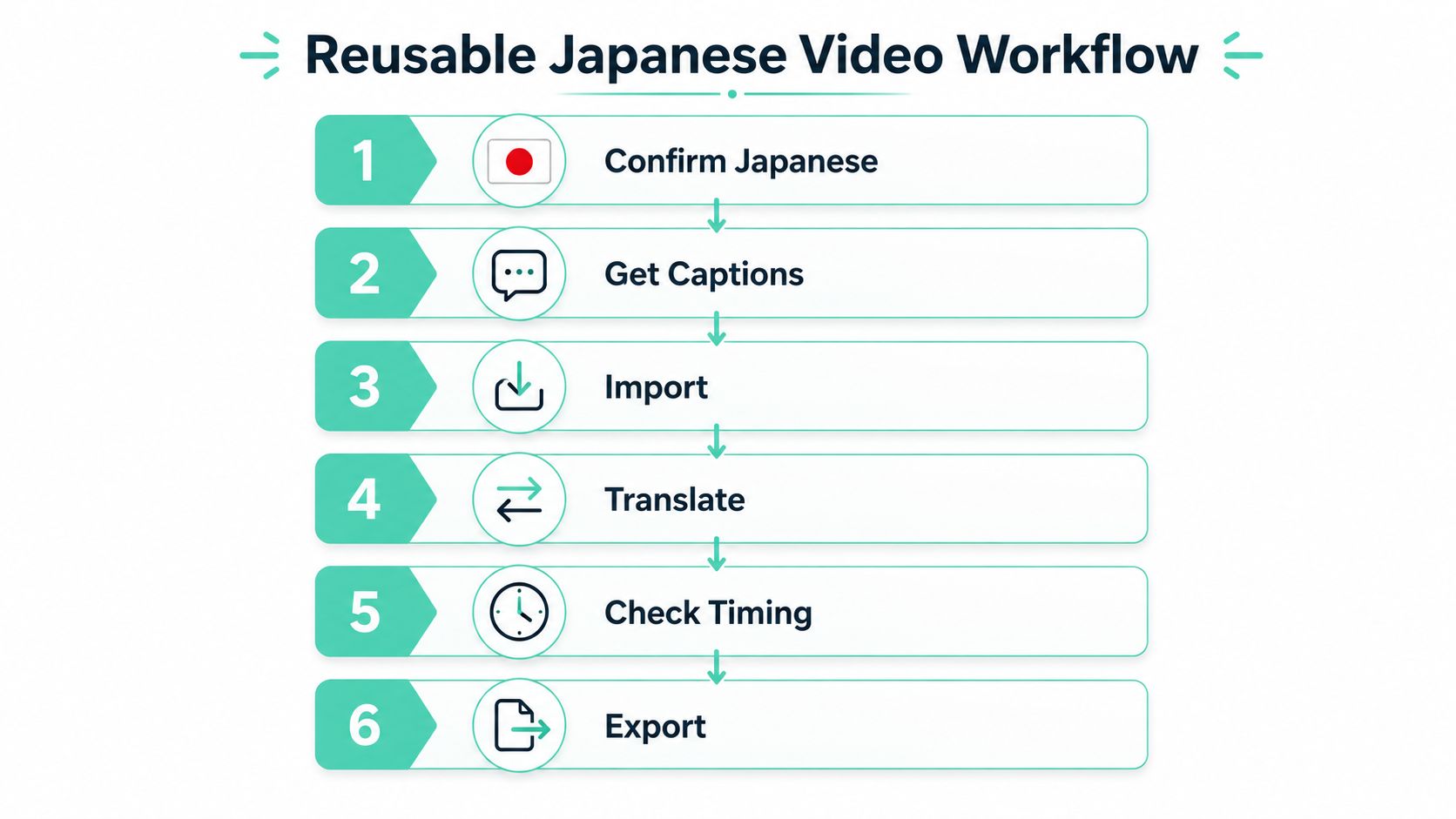
A good Japanese video workflow becomes easier once you stop deciding everything from scratch. The same order works over and over, whether you're handling a webinar, a lecture, an interview, or a social clip.
Keep the sequence fixed
Start by confirming Japanese through metadata or a short audio sample. Then pull existing captions if they're available, or run ASR on clean audio if they're not. Import the cues into an editor that respects character-density rules, translate inside the original cue window, and export in the format the player expects.
After export, run one last pass for half-width drift, romaji bleed-through, and line-length overruns. Those are the small Japanese-specific issues that tend to survive the first cleanup unless you look for them on purpose.
A simple role split helps:
- Automation handles: language detection, first-pass transcription, and draft translation.
- Human review handles: cue tightening, cultural phrasing, and final timing checks.
- Export logic handles: SRT or WebVTT output, depending on the destination player.
The video transcript generator workflow fits that pattern well because it keeps the transcript, timestamps, and export options in one place. That makes the next Japanese file easier to start, since you're reusing a process, not inventing one.
If you're working through Japanese video clips right now, transcript.im gives you a way to pull transcripts from public links or uploads, keep timestamps intact, and move that text into translation or subtitle cleanup without rebuilding the whole file by hand. Visit transcript.im and try the workflow on your next Japanese video, especially if you need clean, reusable timed text instead of another rough draft.
Transcript Generator
Turn Any Video Into Text
Paste a YouTube, TikTok, or Instagram link and read the transcript, with timestamps on every line.
Exports as TXT, SRT, or VTT.